

Quick Start
Get your personal mix up and running in minutes. Follow the steps below from initial Dante setup through dialing in your sound.
Before you beginAssign channels with Dante Controller
Open Dante Controller and go to the Routing window. Expand the transmitting device (your console or digital snake) along the top row, then expand the DPM in the vertical Receivers column.
Click the grid intersection where a transmitting channel and a receiving channel meet to assign them. Repeat for each channel you want in your mix.
-
1
Set master volume
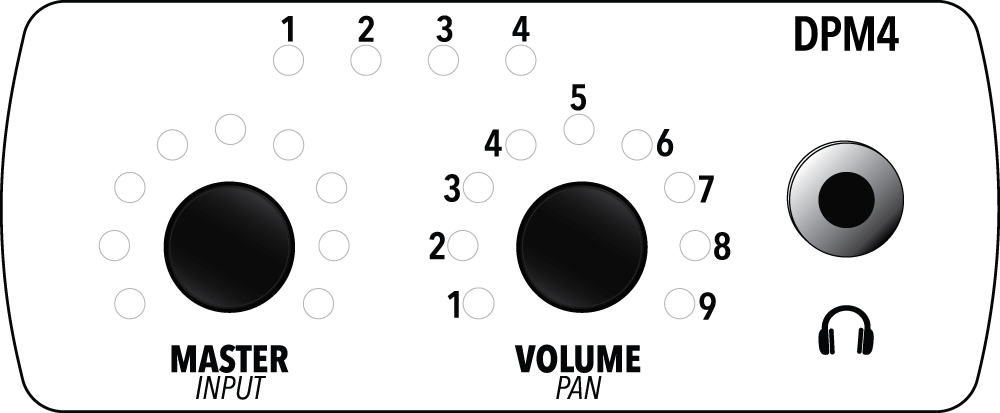
Turn the Master Volume knob to control the overall output level to your headphones or in-ear monitors. This knob is always active regardless of what else you are doing on the unit.
-
2
Select and adjust a channel
PRESS the Master Volume knob to cycle through the available channels for mixing. The active channel indicator LED will illuminate to confirm the active channel.
Once a channel is selected, turn the Volume/Adjust knob to raise or lower that channel’s level in your mix.
-
3
Pan a channel
Press down on the Volume/Adjust knob to enter Pan mode, then turn left or right to position that channel in the stereo field.
- When two channels are stereo linked (see next step), they default to the first channel hard left, the second hard right.
- Turning counterclockwise moves the right channel toward the left. As you continue turning, both channels move toward the far left. Turn clockwise to go back the other direction toward the right.
-
4
Link two channels as a stereo pair
Stereo pairs let you control two related channels (like a stereo keyboard or overhead mics) as one unit with automatic left/right placement.
- Select one of the two channels to link, then LONG PRESS the Volume/Adjust knob to create the pair. Pan defaults to hard left and hard right automatically when stereo paired.
- To return to separate mono channels, select the stereo pair and LONG PRESS the Volume/Adjust knob again.
-
5
Choose a DSP preset
The DPM has 9 built-in EQ and compression presets optimized for different sources. LONG PRESS the Master Volume knob for 2 seconds to enter DSP mode. The Volume/Adjust LED ring will turn purple. Turn the Volume/Adjust knob to select a preset from 1 to 9.
1Flat2HPF3Vocal4Vocal + Guitar5Electric Guitar6Acoustic Guitar7Keys8Bass9DrumsTip: Scroll through all 9 and trust your ears. The presets are labeled by instrument, but what sounds right to you is always the right choice. -
6
Sleep mode
After 10 minutes of inactivity, the DPM enters sleep mode and the LEDs and audio turn off to preserve power. Turn or press any knob to wake the unit or start audio playback.